

This is a tool that can detect when YubiKey is waiting for your touch. It is designed to be integrated with other UI components to display a visible indicator.
For example, an integration with i3wm and py3status looks like this:
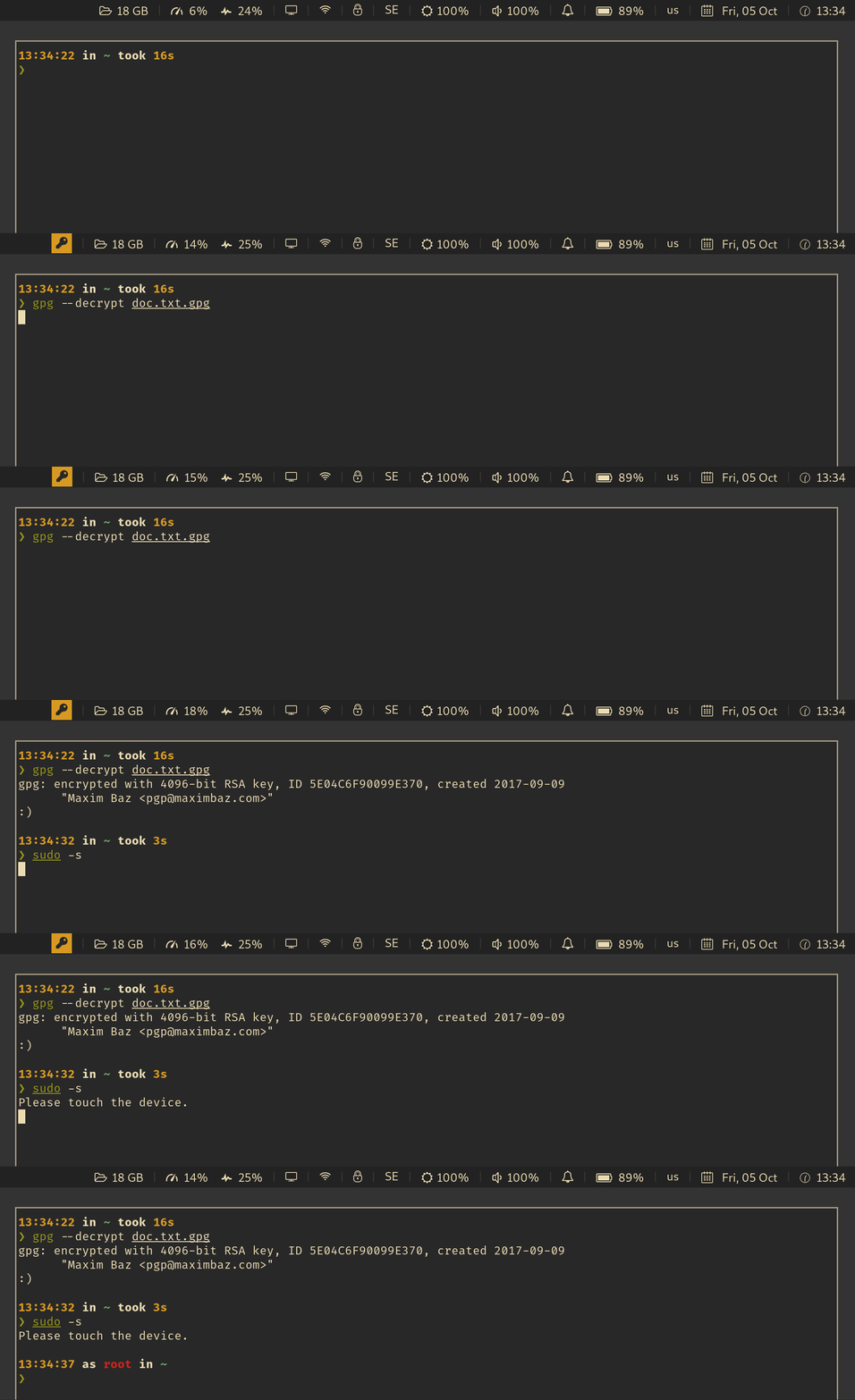
See also: Wiki: Which UI components are already integrated with this app?
This tool works on Linux and macOS.
On Arch Linux, you can install it with pacman -S yubikey-touch-detector
The package also installs a systemd service and socket. If you want the app to launch on startup, just enable the service like so:
$ systemctl --user daemon-reload
$ systemctl --user enable --now yubikey-touch-detector.service
If you want the service to be started only when there is a listener on Unix socket, enable the socket instead like so:
$ systemctl --user daemon-reload
$ systemctl --user enable --now yubikey-touch-detector.socket
Alternatively you can download the latest release from the GitHub releases page. All releases are signed with my PGP key.
Finally you can install the app with go:
Building from source requires Go 1.26 or later. On Linux, install gpgme:
sudo apt install libgpgme-dev
Install the latest release with:
go install github.com/maximbaz/yubikey-touch-detector@latest
This places the binary in your $GOBIN directory, which defaults to $GOPATH/bin.
To test how the app works, run it in verbose mode to print every event on STDERR:
$ yubikey-touch-detector -v
Now try different commands that require a physical touch and see if the app can successfully detect them.
You can make the app show desktop notifications using the freedesktop notification service on Linux or Notification Center on macOS:
$ yubikey-touch-detector --notify
The built-in title and body can be overridden independently:
$ yubikey-touch-detector --notify --notify-title "Security key required: {{.Reasons}}" --notify-body "Touch your YubiKey to continue."
The title and body are Go templates. {{.Reasons}} expands to a sorted, comma-separated list of the active event types (gpg, hmac, and u2f). It can be placed in either field or omitted. The default body is Touch your YubiKey to continue ({{.Reasons}})., allowing notification daemons such as dunst to match the event type.
The app supports the following environment variables and CLI arguments (CLI args take precedence):
| Environment var | CLI arg |
|---|---|
YUBIKEY_TOUCH_DETECTOR_VERBOSE |
-v |
YUBIKEY_TOUCH_DETECTOR_NOTIFY |
--notify |
YUBIKEY_TOUCH_DETECTOR_NOTIFY_TITLE |
--notify-title |
YUBIKEY_TOUCH_DETECTOR_NOTIFY_BODY |
--notify-body |
YUBIKEY_TOUCH_DETECTOR_STDOUT |
--stdout |
YUBIKEY_TOUCH_DETECTOR_NOSOCKET |
--no-socket |
YUBIKEY_TOUCH_DETECTOR_DBUS |
--dbus |
You can configure the systemd service by defining any of these environment variables in $XDG_CONFIG_HOME/yubikey-touch-detector/service.conf - see service.conf.example for a configuration example.
First of all, make sure the app is always running (e.g. start a provided systemd user service or socket on Linux, or a launch agent on macOS).
Next, in order to integrate the app with other UI components to display a visible indicator, use any of the available notifiers in the notifier subpackage.
unix_socket notifier allows anyone to connect to $XDG_RUNTIME_DIR/yubikey-touch-detector.socket on Linux or $TMPDIR/yubikey-touch-detector.socket on macOS and receive the following events:
| event | description |
|---|---|
GPG_1 |
when a gpg operation started waiting for a touch |
GPG_0 |
when a gpg operation stopped waiting for a touch |
U2F_1 |
when a u2f operation started waiting for a touch |
U2F_0 |
when a u2f operation stopped waiting for a touch |
MAC_1 |
when a hmac operation started waiting for a touch |
MAC_0 |
when a hmac operation stopped waiting for a touch |
All messages have a fixed length of 5 bytes to simplify the code on the receiving side.
dbus notifier registers a dbus server at the interface name com.github.maximbaz.YubikeyTouchDetector and path /com/github/maximbaz/YubikeyTouchDetector.
Properties on this dbus interface are discoverable through introspection. Properties also emit PropertiesChanged signals to indicate updates and support gobject binding.
On Linux, the detector uses hidraw, inotify, and GPG agent checks as described below. On macOS, it watches the unified log for FIDO queue events and CryptoTokenKit time-extension events, verifying FIDO devices against Yubico's USB vendor ID through the I/O Registry.
Your YubiKey may require a physical touch to confirm these operations:
sudorequest (viapam-u2f)- WebAuthn
gpg --signgpg --decryptsshto a remote host (and related operations, such asscp,rsync, etc.)sshon a remote host to a different remote host (via forwardedssh-agent)HMACoperations
See also: FAQ: How do I configure my YubiKey to require a physical touch?
In order to detect whether a U2F/FIDO2 operation requests a touch on YubiKey, the app is listening on the appropriate /dev/hidraw* device for corresponding messages as per FIDO spec.
See detector/u2f.go for more info on implementation details, the source code is documented and contains relevant links to the spec.
The detector runs as a transparent proxy on the normal gpg-agent socket and observes Assuan operations using private keys stored on a smartcard. It does not retain or log operation payloads.
Only the oldest active smartcard operation is checked. Operations queued behind it begin their check only after reaching the front of the queue, preventing a burst of cached signing operations from being mistaken for multiple touch requests. Time spent in a Pinentry prompt is excluded when the agent reports the Pinentry process.
A notification is shown when the front operation remains pending after this filtering. This is still a heuristic because gpg-agent does not expose the card's actual touch state, but it avoids issuing additional card commands and distinguishes a stalled operation from queued activity.
The proxy preserves Unix file descriptor passing and restores the original agent socket when the detector exits. Shadowed private keys are discovered inside $GNUPGHOME/private-keys-v1.d/*.
If the path to your
private-keys-v1.dfolder differs, define$GNUPGHOMEenvironment variable, globally or in$XDG_CONFIG_HOME/yubikey-touch-detector/service.conf.
The requests performed on a local host will be captured by the gpg detector. However, in order to detect the use of forwarded ssh-agent on a remote host, an additional detector was introduced.
This detector runs as a proxy on the $SSH_AUTH_SOCK, listens to communications with that socket, and starts an independent card busy check when an event is captured.
This detection is based on the observation that a certain /dev/hidraw* device will disappear when YubiKey will start waiting for a HMAC, and reappear when it stops waiting for a touch.
For sudo requests with pam-u2f, please refer to the documentation on Yubico/pam-u2f and online guides (e.g. official one).
For gpg and ssh operations, install ykman and use the following commands:
$ ykman openpgp keys set-touch sig on   # For sign operations
$ ykman openpgp keys set-touch enc on   # For decrypt operations
$ ykman openpgp keys set-touch aut on   # For ssh operations
If you are going to frequently use OpenPGP operations, cached or cached-fixed may be better for you. See more details here.
Make sure to unplug and plug back in your YubiKey after changing any of the options above.