
DevTools Autosave on Google I/O 2012 · Intro to DevTools Autosave version 0.x (a bit outdated)
Chrome DevTools let you edit CSS and JavaScript. It even allows you to save it. I think, it’s annoying to choose a folder you want to save to for every file. DevTools Autosave saves the files on every change for you!
Chrome DevTools Autosave consists of a Chrome extension and a server. The extension pushes changed files to the server. The server resolves URL of these files and overwrites the old ones with the new ones.
Install the Extension
Install the Server
$ autosave
DevTools Autosave is listening on http://127.0.0.1:9104
Open example/index.html locally (using file:// scheme).
Edit some CSS and JS.
That’s it. Files have been saved.
Google Chrome has an onResourceContentCommitted event that fires when you edit CSS and JavaScript.
chrome.experimental.devtools.inspectedWindow.onResourceContentCommitted.addListener(function(resource, content) {
    resource.url
    resource.type // 'script', 'stylesheet' or 'document' (happens when you edit inline JS or CSS)
    content // all the content of updated file as a string
})
Nice, isn’t it?
More on Autosave protocol.
I’m developing on
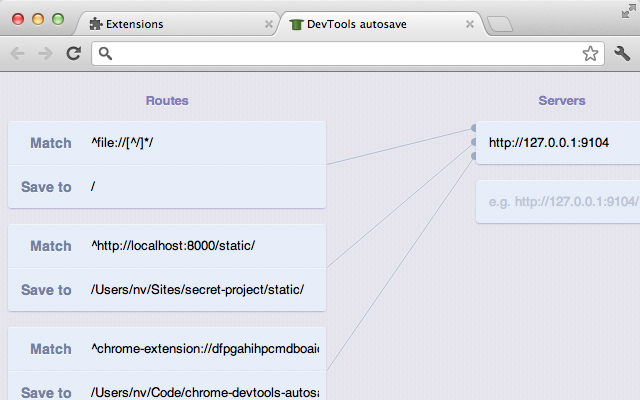
http://localhost/(orhttp://you-name-it/) instead offile://. Can I make Autosave work?
Sure, just add a new route to the extension’s options.
All the alternative listed below miss one Autosave’s feature: saving newly added CSS rules to the last stylesheet file.

Latest Chrome DevTools support Workspaces which makes Chrome DevTools Autosave obsolete.
The same as Autosave but doesn’t require you to install the server and does both ways syncing!
Two-way sync, requires to install Node and write JS config files.
Works only with JetBrains IDEs, such as WebStorm.